
The four laptops
I generated each report with powercfg /batteryreport between 3 and 7 November 2026. Health is Full Charge Capacity divided by Design Capacity, taken from the Installed batteries section on the day of the report.
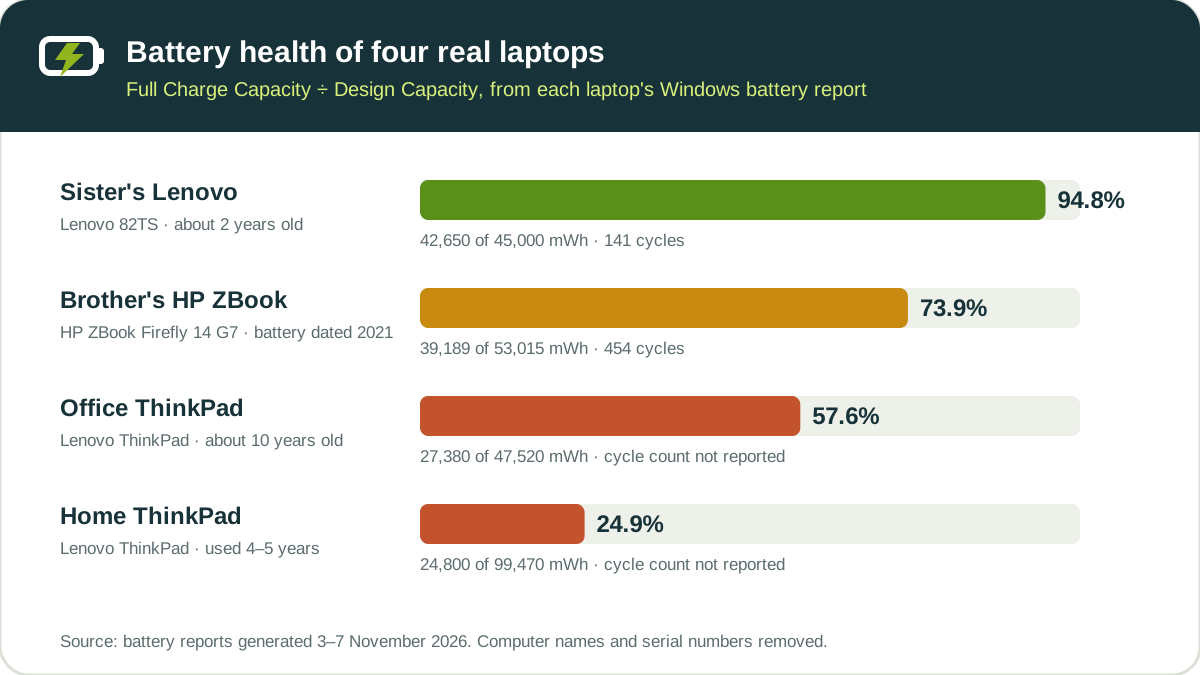
| Laptop | Age | Design | Full charge | Health | Cycles |
|---|---|---|---|---|---|
| Sister's Lenovo (82TS) | About 2 years | 45,000 mWh | 42,650 mWh | 94.8% | 141 |
| Brother's HP ZBook Firefly 14 G7 | Battery dated January 2021 | 53,015 mWh | 39,189 mWh | 73.9% | 454 |
| Office Lenovo ThinkPad | About 10 years, bought refurbished | 47,520 mWh | 27,380 mWh | 57.6% | Not reported |
| Home Lenovo ThinkPad | Used for 4–5 years | 99,470 mWh | 24,800 mWh | 24.9% | Not reported |
| Laptop | Runtime at full charge* | At design capacity* | Modern Standby | How it is used |
|---|---|---|---|---|
| Sister's Lenovo | 2 h 34 min | 2 h 43 min | Supported | Short history: Windows was reset in October 2026 |
| Brother's HP | 2 h 39 min | 3 h 35 min | Supported | Mixed: about 20 minutes to 3 hours a day on battery |
| Office ThinkPad | 1 h 14 min | 2 h 09 min | Not supported | Almost always on the charger |
| Home ThinkPad | 3 h 38 min | 14 h 35 min | Not supported | Mixed AC and battery for years |
*Windows' own "since OS install" estimate for active use, from the Battery life estimates section. The home ThinkPad's figure is averaged over years of lighter use; in its most recent week Windows estimated 1 h 23 min.
The full table is also available as a CSV file if you want to compare it with your own report.
What the data shows
1. Age alone doesn't predict battery health
The HP's battery is close to six years old and has 454 cycles, yet it still holds 73.9% of its design capacity. The home ThinkPad, used for four to five years, holds 24.9%. Its reports show weeks with 21 to 56 hours on battery in 2024, so it has done far more hard work than the office ThinkPad, which sits on the charger almost all day. How a battery is used matters as much as how old it is.
2. Older laptops may not report a cycle count at all
Both ThinkPads show a dash instead of a cycle count. The newer Lenovo (141 cycles) and the HP (454 cycles) report it normally. A dash is a firmware limitation, not a broken report. See what to do when the cycle count is missing.
3. A single reading can be far off
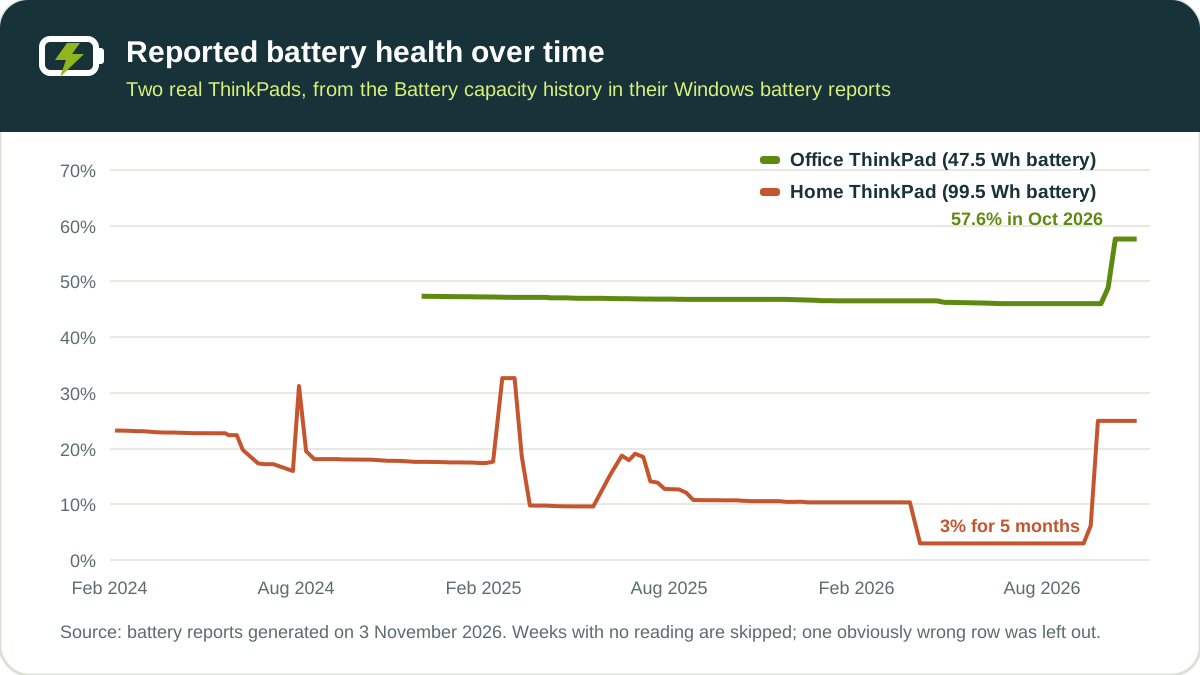
The home ThinkPad reported 2,960 mWh (3%) from April to mid-September 2026, then about 25% from late September. The office ThinkPad drifted from 47% to 46% over almost two years, then jumped to 57.6% in October 2026. Nobody replaced or recalibrated either battery; the cause is unknown, most likely the battery's fuel gauge correcting its own estimate.
More on reading these numbers: battery health percentage with real examples.
4. Even healthy batteries move a few points from day to day
The HP's daily full charge readings ranged from 36,853 to 38,770 mWh (69.5% to 73.1%) over three weeks. The sister's Lenovo moved from 43,169 to 42,650 mWh in the same period. Judge the trend across several readings, not one row. The HP's numbers are worked through in when to replace a laptop battery.
5. Battery reports contain impossible values
- Office ThinkPad: one day in the capacity history shows 83,235 mWh against a design of 144,460 mWh, about three times the real battery.
- Sister's Lenovo: Usage history lists 592,618 hours on AC power for a single week, which is about 67 years.
- Both Modern Standby laptops: standby estimates swing wildly. The Lenovo shows 1,929 hours on one day and a drain of 994% per 16 hours on another; the HP reaches 1,061% per 16 hours.
If a value is impossible, skip that row and use the ones around it. The real battery report walkthrough shows where these rows appear.
6. Modern Standby splits laptops into two groups
The two ThinkPads show Connected Standby: Not supported, so their reports list sleep as Suspended. The Lenovo 82TS and the HP show Supported, so their reports list Connected standby sessions instead, and both have the wildly varying standby estimates above. See Suspended vs Connected standby.
7. Real runtime depends on load as much as on health
The office ThinkPad used 70% of its battery in 48 minutes at about 24 W, which puts a full charge at roughly 1 hour 9 minutes. Windows' long-term estimate was 1 hour 14 minutes. The HP used 70% in 1 hour 2 minutes at about 25 W, so heavy work empties it in about an hour and a half, even though Windows estimates 2 hours 39 minutes for average use. You can check your own numbers with the laptop battery life calculator.
How the data was collected
- Source: one Windows battery report per laptop, created with
powercfg /batteryreportbetween 3 and 7 November 2026. Two laptops are mine; the other two belong to my sister and brother, who shared their reports with me. - Privacy: computer names and battery serial numbers are removed from every screenshot and from this page.
- Calculations: health = Full Charge Capacity ÷ Design Capacity × 100, from the Installed batteries section. Runtime figures are Windows' own estimates, except where I worked out watts from the Battery usage section (energy drained ÷ duration).
- What was not done: no battery was opened, swapped or tested with lab equipment. The values are what each battery's firmware reported to Windows.
Limits of this data
Four laptops from two manufacturers are not a representative sample, so these figures don't tell you what is normal for every laptop of a given age. They show how real reports behave: missing fields, sudden jumps, daily movement and occasional nonsense rows. I'll add more laptops to this page as I collect more reports. If you'd like to share yours, send the Installed batteries and Battery capacity history sections through the contact page, with the computer name and serial number removed.
You can reuse this data, including the CSV file, under the Creative Commons Attribution 4.0 (CC BY 4.0) licence, as long as you credit Battery Health Lab with a link to this page.
To check your own laptop, run the free battery report checker. It reads the report in your browser and doesn't upload it.

Senior software engineer in Karachi with more than five years of experience building web applications in ASP.NET Core, C# and JavaScript. He built the free battery health checker and checks each guide against Microsoft and laptop makers’ support documentation.