
Real numbers from four laptops are in the data section below. To see how far along your own battery is, open your Windows battery report in the free battery health checker; nothing is uploaded.
How many years does a laptop battery last?
A laptop battery doesn't stop working on a fixed date. It slowly holds less energy, so the laptop runs for less time on each charge. What people mean by "the battery is finished" is the point where that shorter runtime gets in the way.
For most laptops that point comes after 2 to 4 years. Dell's battery FAQ says typical users notice reduced runtime after 18 to 24 months, and power users within 18 months. A laptop that is mostly plugged in and kept cool can go well beyond that; one that is used on battery all day, every day, in a hot room can get there sooner.
Age on its own is a weak predictor. How the battery was used matters at least as much, and the real reports below show that clearly.
How many charge cycles does a laptop battery last?
One charge cycle is 100% of the battery's capacity used, in total. Using 50% today and 50% tomorrow adds up to one cycle, not two.
- Apple rates recent MacBooks for 1,000 cycles and says the battery is designed to retain up to 80% of its original capacity at that count. Older Mac laptops were rated for 300 or 500 cycles.
- Windows laptops rarely publish a cycle rating, but the cells are the same lithium-ion chemistry. Battery University's figures put a typical cell charged to 4.20 V per cell (a normal "100%") at about 300 to 500 cycles.
So a rough rule: 300 to 500 cycles for an ordinary laptop battery, up to 1,000 for models rated for it. You can see your own count in the battery report; our cycle count guide shows where, and what to do if it's missing.
Real data: how four laptop batteries have aged
These are the latest readings from Windows battery reports generated on four laptops in my family in November 2026. Health is Full Charge Capacity ÷ Design Capacity.
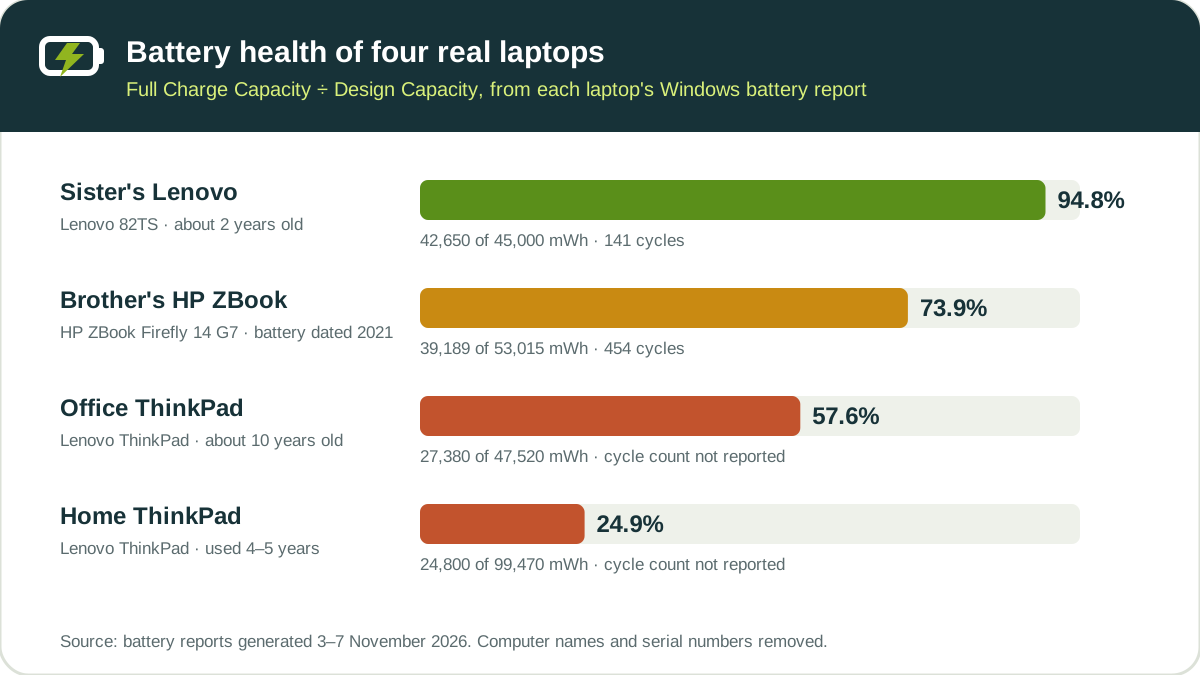
| Laptop | Age of battery | Cycles | Health | How it has been used |
|---|---|---|---|---|
| Sister's Lenovo 82TS | About 2 years | 141 | 94.8% | Mixed, short history |
| Brother's HP ZBook Firefly 14 G7 | Battery dated January 2021 | 454 | 73.9% | About 20 minutes to 3 hours a day on battery |
| Office Lenovo ThinkPad | About 10 years (bought refurbished) | Not reported | 57.6% | Almost always on the charger |
| Home Lenovo ThinkPad | Used for 4–5 years | Not reported | 24.9% | Mixed AC and battery for years |
What stands out:
- The two-year-old Lenovo has lost only about 5%. At 141 cycles it is early in its life, which fits a 300–500 cycle battery.
- The HP has lost about a quarter after 454 cycles. That is close to the end of a typical rating, and it is the point where people start to notice shorter runtime. I go through whether to replace it in the when to replace guide.
- Age didn't decide the order. The office ThinkPad is the oldest machine and still holds 57.6%, while the home ThinkPad, used on and off battery for 4–5 years, is down to 24.9%. Because the office laptop was bought refurbished, its battery may not be original, so treat its age as an upper limit.
All the numbers, including the odd ones, are on the real battery report data page with a CSV.
How many hours does a laptop battery last on one charge?
Runtime per charge is a different question from lifespan. It depends on how much energy the battery holds today and how much power the laptop is drawing:
Runtime (hours) = battery energy (Wh) ÷ power draw (W)
Windows estimates it from your own usage in the report's Battery life estimates section. For the same four laptops:
| Laptop | Estimated runtime at full charge | When the battery was new (design capacity) |
|---|---|---|
| Sister's Lenovo | 2 h 34 min | 2 h 43 min |
| Brother's HP | 2 h 39 min | 3 h 35 min |
| Office ThinkPad | 1 h 14 min | 2 h 09 min |
| Home ThinkPad | 3 h 38 min | 14 h 35 min |
The gap between the two columns is what battery wear feels like in daily use. The HP lost almost an hour per charge; the home ThinkPad, with a large 99 Wh battery and light use, went from an estimated 14 hours to under 4.
To work out your own figure from capacity and real power draw, use the battery life calculator. Windows' estimates are averages, so the battery life estimates guide explains how far to trust them.
What makes a laptop battery wear out faster?
- Heat. Battery University's storage figures show a cell kept at 100% charge for a year keeps about 80% of its capacity at 25 °C but only about 65% at 40 °C. A laptop on a bed or sofa, or a gaming laptop under load, runs hot.
- Sitting at 100% for long periods. High charge voltage is hard on lithium-ion cells. The same source estimates that lowering the peak charge voltage by 0.10 V per cell roughly doubles cycle life, at the cost of some capacity.
- Deep discharges. Running the battery from full to empty every time uses up cycles faster than shallow top-ups. Battery University's table for typical laptop cells (NMC) shows about 300 cycles at 100% depth of discharge and about 1,000 at 40%.
- Heavy, constant load. High power draw means more heat and faster cycling.
How to make a laptop battery last longer
- Use a charge limit if your laptop has one. Lenovo Vantage, MyASUS, Dell Power Manager and HP's BIOS options can stop charging at around 80%. If your laptop already stops there, that's the feature working; see why a laptop stops charging at 80%.
- Keep it cool. Use it on a hard surface and don't leave it charging in a hot car or under a blanket.
- Avoid running it to 0% as a habit. Charging from 20–30% is gentler than from empty.
- Keep BIOS and manufacturer power software updated. Updates often change charging behaviour and battery reporting.
None of these will stop ageing. They slow it down, which can add a year or more before the runtime becomes a problem. For day-to-day habits, see how to charge a laptop battery correctly.
When is it time to replace the battery?
Replace the battery when its runtime no longer covers your day, not because of a birthday or a single percentage. Dell's guidance mentions a battery under 50% of its original capacity as a clear sign. Swelling, sudden shutdowns or a warning from the manufacturer's diagnostics mean replace now. The full checklist is in when to replace a laptop battery, and is 80% battery health good? explains what a common middle result means.
Check how far along your battery is
- Open Command Prompt and run
powercfg /batteryreport. - Open the battery-report.html it saves (often in your user folder, or C:\Windows\System32 if you ran it as administrator).
- Open the file in the battery health checker to see health, wear and cycle count in one place.
Compare your health and cycle count with the ranges above. If you're under about 300 cycles and still above 80%, the battery is early in its life.
Frequently asked questions
How long do laptop batteries last?
Usually 2 to 4 years, or about 300 to 1,000 charge cycles depending on the battery's rating, before the shorter runtime becomes noticeable. Heat, long periods at 100% and heavy use shorten that range.
Is it normal for a 3-year-old laptop battery to hold less charge?
Yes. After about three years of regular use, a battery typically holds noticeably less than when it was new. In our data, an HP battery from early 2021 with 454 cycles was at 73.9%.
How many cycles before a laptop battery should be replaced?
There is no fixed number. Many laptop batteries are designed for roughly 300 to 500 cycles, and some for 1,000. Replace it when the runtime no longer meets your needs or the health falls below about 50%, rather than at a specific cycle count.
Does keeping a laptop plugged in all the time shorten battery life?
Keeping a battery at 100% for long periods, especially when it is warm, speeds up wear. If your laptop is plugged in most of the day, turn on the manufacturer's charge limit (often 80%) so the battery isn't held at full charge.
Where these numbers come from
Lifespan figures come from manufacturer and reference documentation: Apple's cycle count ratings for Mac laptops, Dell's laptop battery FAQ, and Battery University's article on prolonging lithium-based batteries. The four laptops' figures come from Windows battery reports generated with powercfg /batteryreport between 3 and 7 November 2026, with computer names and serial numbers removed.
Summary
Expect about 2 to 4 years or 300 to 1,000 cycles from a laptop battery. How you use it matters as much as how old it is: our four laptops range from 94.8% after two years to 24.9% after four or five. Keep it cool, avoid sitting at 100% for days, and check the battery report once in a while so a shorter runtime doesn't catch you by surprise.

Senior software engineer in Karachi with more than five years of experience building web applications in ASP.NET Core, C# and JavaScript. He built the free battery health checker and checks each guide against Microsoft and laptop makers’ support documentation.